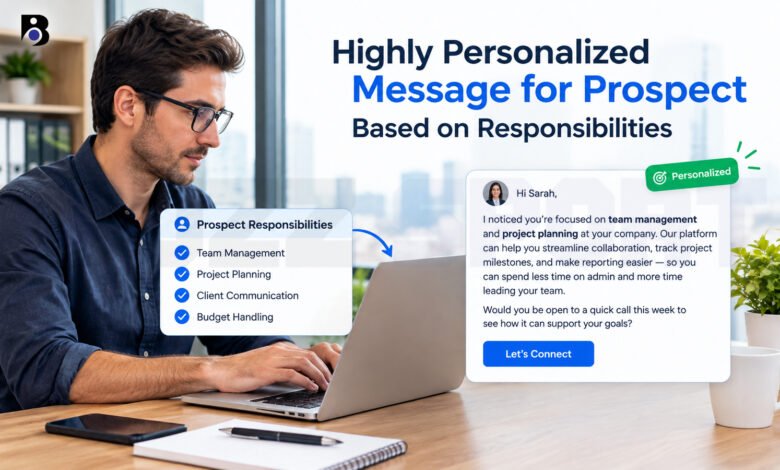
You open your inbox and see two emails from people you do not know. The first one says, “Hi there, we help companies grow.” The second one says, “I saw that you manage the onboarding process for new customers. Many people in that job tell me the first week is the hardest part.” Which one will you read?
Most people pick the second one. It speaks about their work. It feels like the sender took a few minutes to think about them.
That is the idea behind a highly personalized message for a prospect based on responsibilities. You look at what the person does every day, and you write to that. In this guide, you will learn what this kind of message is, why it works, and how to write one in five easy steps. You will also see simple examples, common mistakes, and answers to three common questions.
What Is a Highly Personalized Message Based on Responsibilities?
A prospect is a person who might want to buy from you or work with you, but has not said yes yet. A personalized message is a message written for one person or one small group. It is not the same text sent to everyone.
When you base your message on responsibilities, you use the duties of the person’s job as the starting point. Instead of only using the name and the company, you write about the tasks and goals that fill their week.
Here is a simple way to see the difference:
- Basic personalization: “Hi Sara, I see you work at Bright Foods.”
- Responsibility-based personalization: “Hi Sara, since you lead the customer support team at Bright Foods, I guess that keeping reply times short is a big part of your job.”
The second message shows that you understand her role. It also gives you a natural reason to start a talk.
Why Responsibilities Matter So Much
Every job has its own tasks, worries, and goals. A finance manager thinks about budgets and reports. A recruiter thinks about open roles and good candidates. A marketing lead thinks about leads and campaigns.
A company called Intelemark explains that job titles are important when you group your prospects, because different roles in a company have different duties and concerns. Because of that, one message for all roles will feel wrong for most readers.
Hunter, a company that builds email tools, makes a similar point. Different roles may care about the same final result, but the way you speak to them should change.
Siemens also wrote about this on its partner blog. It says that when outreach mentions a person’s role, company priorities, or industry, replies improve because the message feels more researched and less automatic.
There is also a trust effect. LaGrowthMachine says custom messages help the reader feel understood. When people feel understood, they are more open to listen.
Step 1: Learn What the Person Really Does
The first step is simple research. You need to know the person’s role, how long they have been in it, and what they are in charge of.
Good places to look:
- Their LinkedIn profile. It often lists their title, past jobs, and sometimes a short text about their work. Siemens suggests saving the LinkedIn profile as a PDF so you can use it for research or to give it to an AI tool.
- The company website. Look at the team page, the blog, and the news section. You can learn what the company cares about right now.
- Job posts from the same company. A job post for a similar role often lists the main duties in plain words.
- Your CRM. If you already store notes about the person, read them first.
River Editor describes a useful habit: a one-page prospect brief. One part of the brief is the contact background, which includes the current role, how long the person has been there, and their stated responsibilities. You do not need a long document. A few short notes are enough.
A small warning: Use only information that is public and fits the work. The Hunter cold email guide says you should use details that people share willingly and that are not sensitive. Talk about their job. Do not talk about their family or their private life.
Step 2: Turn Each Duty Into a Possible Problem
Knowing a duty is not enough. You need to ask, “What can be hard about this duty?”
Take a look at this example:
| Responsibility | Possible challenge |
|---|---|
| Manage a customer support team | Long reply times, high ticket numbers |
| Plan marketing campaigns | Low response rates, small budgets |
| Hire new team members | Too many weak applications, slow hiring |
| Run company payroll | Mistakes, late reports, many manual steps |
HumanLinker gives the same advice. Research the usual duties and challenges of the role, and match your message to what matters most in that job.
Be careful here. These are guesses, not facts. You do not know if this person has this problem. That is why a question often works better than a strong statement. We will come back to this in Step 4.
Klaviyo’s sales course adds one more idea. Personalization goes beyond a job title. Each buyer has their own goals and motives, so it helps to think about what the person wants to achieve, not only what their title says.
Step 3: Pick One Clear Hook
A hook is the first idea that makes the reader think, “This is about me.”
Do not try to use every detail you found. Pick one. A good hook connects to one duty and one possible challenge.
Here are some hook ideas:
- A duty from their profile (“I saw that you lead the onboarding team.”)
- A change in the role (“Congratulations on your new role as head of operations.”)
- A company event (“I read that your company opened a new office.”)
- A shared interest in their work (“I liked your post about handling hard customer calls.”)
HubSpot says that each message should connect to something the prospect cares about right now. Examples are a new product launch, a hiring plan, or a new tool they are setting up.
If you use a new job or a company announcement, check it first. A guide from ConsultEvo says you should verify the role and the duty, and use the news only if it links to the person’s work. If it does not, ask a neutral question. Do not guess that they have a project or a budget.
Step 4: Write a Short, Clear Message
Now you can write. Keep these rules in mind.
Be short. Valley, a company that makes LinkedIn outreach tools, advises you to get to the point early and skip details that make the message too long. Four to six short sentences are often enough.
Use a simple structure. Many teams use this order:
- A greeting with a detail about the person’s role
- A short link between their duty and a common challenge
- One line about how you helped someone in a similar job
- One easy question at the end
SBI Growth uses a similar idea. It calls it a point of view for each buyer type. The point of view shows you understand how you can help a certain person, mentions how you helped others in a similar situation, and ends with an open question.
Ask, do not push. An easy question such as “Is this something you are working on this year?” is better than “Book a call with me today.”
Write the way you talk. Short words and short sentences make a message easy to read on a phone.
Example 1: Customer support manager
Hi Sara,
I saw that you lead the customer support team at Bright Foods. In my talks with other support leads, I often hear that busy weeks make reply times hard to control.
We helped a small support team sort their tickets by topic, so the right person saw each ticket first. Their team spent less time passing tickets around.
Is reply time something your team is working on right now?
Best, Alex
Example 2: Marketing manager
Hi Daniel,
Your profile says you plan the email campaigns at Nova Fitness. That job usually means you must test many ideas with a small team.
I wrote a short guide on how small teams test subject lines without extra work. Would you like me to send it?
Thanks, Maya
Example 3: HR or recruiting manager
Hi Priya,
Congratulations on your new role as recruiting lead at Green Build. I know the first months often mean sorting many applications and keeping hiring managers happy.
We work with recruiting teams that want a clearer way to track candidates. Are you looking at your hiring process right now?
Kind regards, Omar
These examples are made up to show the style. Always change the details to fit the real person and your real offer.
Step 5: Check, Send, and Follow Up
Before you press send, read your message once more.
Quick checklist:
- Is the person’s role and company name correct?
- Is every fact true and easy to prove?
- Does the message sound like a real person?
- Is there only one question or one next step?
- Would you be happy to receive this message?
The last question is very important. A personalized message that feels fake is worse than a simple honest one. One article from Cotera says that bad personalization can perform worse than no personalization. If the detail is wrong or feels strange, the reader will notice.
Follow up. Many people reply to the second or third message, not the first. Scaledmail suggests that the first email uses the person’s role, industry, or recent activity, and the follow-up refers to the first email or offers more value, such as a case study. Keep your follow-up short and kind. Add something new each time, such as a helpful article, a short example, or a new idea.
Then look at your results. Which roles reply more? Which opening lines work best? Bardeen notes that you should keep improving your approach based on data and feedback.
How to Do This for Many Prospects
Writing one message by hand is easy. Writing 200 is hard. Here are a few ways to keep it personal when your list is long.
Group people by role. LeadHaste explains two styles. One is deep, one-to-one personalization, where you research one account and write something only that person could get. The other is relevance at scale, where you personalize by role, industry, or situation, so the message feels right for everyone in that group. Responsibility-based messages work well in the second style. You can write one strong message for all support managers and another for all recruiters.
Use a template with open spaces. Reply.io offers a title-based template that includes a line about the person’s title and a duty that likely belongs to the job. Then you change the open spaces for each person. Check each message before you send it, so a wrong job title does not slip through.
Use AI tools with care. AI can help you read a profile and suggest a draft. Still, you should read and edit every message. Make sure the facts are right and the tone sounds like you.
Keep your notes in one place. A CRM or a simple spreadsheet helps you remember what you learned about each person. Intelemark notes that a CRM can store useful data about prospects and help you write messages faster.
Common Mistakes to Avoid
- Using only the name. “Hi John” is not personalization. Many people see it as an automatic email.
- Guessing too much. Saying “I know you struggle with X” can feel rude if it is wrong. Ask a question instead.
- Writing about yourself first. Start with the reader’s work, then talk about what you can do.
- Adding too many details. One hook is enough. A long list of facts about the person can feel strange.
- Using private information. Stay with work topics only.
- Forgetting the next step. End with one simple question so the reader knows what to do.
- Never testing. Try two versions of your opening line and see which one gets more replies.
Quick Tips to Remember
- Read the person’s role before you write a single word.
- Think about the daily tasks, not only the title.
- Use one hook, one idea, and one question.
- Keep your message short enough to read in less than a minute.
- Be honest about what you know and what you guess.
- Follow up with something new and useful.
Final Thoughts
A highly personalized message for a prospect based on responsibilities is not about tricks. It is about showing respect for the other person’s time and work. When you take a few minutes to learn what someone does, you can write a message that is useful, honest, and easy to answer.
To sum up, remember the five steps: learn the role, link duties to challenges, pick one hook, write a short message, and check before you send. Practice with a few people first. Then watch which messages get answers, and keep improving.
Frequently Asked Questions
What does “personalized message based on responsibilities” mean?
It means you write to a person about the main tasks and goals of their job. You use what you learned about their duties to show why your message matters to them. For example, if a person manages a support team, you might write about reply times or ticket handling. This is more useful to the reader than a message that only uses their name.
How do I find a prospect’s responsibilities?
Start with their LinkedIn profile and the company website. Then look at job posts for similar roles, because they often list the main duties in simple words. You can also check your CRM notes or ask a colleague who has talked to the company before. Remember that what you find is a good guess, not a fact. That is why a polite question works better than a strong claim.
How long should a personalized prospect message be?
Short is better. Four to six sentences are often enough. Start with a clear detail about the person’s role, link it to a common challenge, add one short proof or example, and end with one easy question. If the message needs more than a minute to read, cut some parts.