Brand Name Normalization Rules: 9 Easy Steps to Keep Your Brand Name Clean

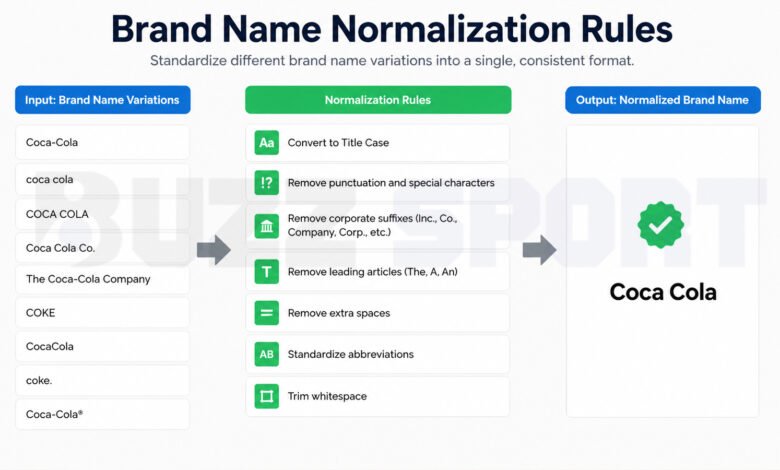
Have you ever looked at your customer list and seen the same company written five different ways? “Acme Inc.”, “ACME”, “acme inc”, “Acme, Inc” and “The Acme Company” can all mean the same business. A person can see that right away. A computer cannot.
This is a small problem that grows fast. Your reports show the wrong numbers. Your sales team calls the same company twice. Your marketing tool sends two emails to one account. And on the web, search engines can get mixed signals about who you are.
The fix is simple to explain: brand name normalization rules. In this guide, I will show you what they are, why they matter, and nine easy steps to build your own rule set. I will use plain words and real examples, so you can start today.
What Are Brand Name Normalization Rules?
Brand name normalization rules are a set of steps that turn many versions of a brand name into one standard version. That standard version is often called the canonical name. Think of it as the “official spelling” that every system in your company agrees on.
Here is a quick example.
| What people typed | After normalization |
|---|---|
| acme inc | Acme |
| ACME, INC. | Acme |
| The Acme Company | Acme |
| Acme (with extra spaces) | Acme |
All four lines now point to one brand. That is the whole idea.
It helps to know how this is different from brand guidelines. Brand guidelines usually talk about logos, colors, and tone of voice. Normalization rules are more technical. They focus on how the name itself is stored, matched, and shown in your tools and on the web.
You may also hear two other words that sound close:
- Normalization means cleaning a name so your systems can compare it and match it. It is mostly for internal work.
- Standardization means choosing one format that everyone must follow, like always writing “Co.” as “Company”.
- Canonicalization means picking the one true version when many versions exist.
In real work, these three ideas overlap a lot, and teams often use them together.
Why Brand Name Normalization Rules Matter
You might think this is only a task for data teams. It is not. Clean brand names help many parts of a business.
1. Better data and fewer duplicates. When the same company appears under different spellings, your CRM (the tool that stores customer records) creates extra records. That makes it hard to see the real picture of one customer. Normalization helps your system find and merge these copies.
2. Better reports. If one brand is split across four spellings, your charts show four small numbers instead of one big number. Clean names give you results you can trust.
3. Stronger online presence. Google says that your business name on your Business Profile should match the real-world name that you use on your sign, your website, and your paper documents. If your name is different in different places, it is harder for people and for search tools to connect the dots.
4. Better customer experience. Nobody likes getting two emails with two different spellings of their company name. It looks careless. Clean names make your messages feel more personal and professional.
5. Less manual work. When rules run on their own, your team stops fixing the same errors again and again.
9 Easy Steps to Build Your Brand Name Normalization Rules
Most normalization tools run rules in order, one after another. So the order matters. The steps below follow a logical path, from the simplest cleanup to the more careful decisions.
Step 1: Choose the Official Brand Name First
Before you write any rule, decide what the “right” name is. This sounds easy, but it can cause real debate.
Ask questions like these:
- Do we use the short name or the full legal name?
- Is “Google” the main name in our system, or is it “Alphabet”?
- Which version appears on our website, our sign, and our invoices?
For your own business, the best answer is usually the name your customers already know. Google gives similar advice for local listings: use the real-world name that people see on your storefront and your website. If a shorter version is common, many experts still suggest using the full real name on the profile.
Write the final decision in a shared document. This becomes the “source of truth” for everyone.
Step 2: Clean Extra Spaces and Hidden Characters
This is the easiest win. Many matching errors come from tiny things you cannot see.
A name with a space at the end will not match the same name without that space. The same is true for double spaces in the middle of a name.
So your first rules should:
- Remove spaces at the start and end.
- Change double spaces into single spaces.
- Remove hidden or strange characters, such as invisible marks that sometimes come from copy and paste.
Step 3: Fix the Letter Case
People type names in all kinds of ways: “acme”, “ACME”, “Acme”. For matching, many systems change everything to lowercase first. That way, “ACME” and “acme” are treated as the same text.
There is one important point. Use the lowercase version for comparing names. Use the proper display version for showing names. For example, you may compare names in lowercase, but you should still show “Acme” on your website, not “acme”.
Also, be careful with brands that choose a special style on purpose, such as “eBay” or “iPhone”. If you force these into a normal capital style, you can break the real brand name. Keep a list of these special cases.
Step 4: Handle Punctuation and Special Characters
Commas, dots, dashes, and symbols make names look different even when they mean the same thing. “Acme, Inc.” and “Acme Inc” should match.
A simple rule is to remove punctuation for matching. But think before you apply it to everything. Some brand names use punctuation as part of the name. Yahoo! is a good example, and “Procter & Gamble” has an ampersand.
Google also has a rule here for business listings. If your real name includes special characters or legal terms, you need real-world proof, such as signs, business cards, or invoices that always show them in your name. That is a good reminder to keep your own materials consistent.
There is also a deeper layer for names with accents or unusual letters. The same letter can be stored in more than one way inside a computer. For example, “é” can be saved as one character, or as an “e” plus a small accent mark. They look the same to you, but a computer may see two different texts. A standard called Unicode normalization solves this. It has four forms, called NFC, NFD, NFKC and NFKD. If you are not sure which one to use, NFC is usually a safe default. NFKC is stronger, because it also turns things like full-width letters and special joined letters into plain ones. But it can lose some detail, so use it with care.
Step 5: Deal With Legal Endings
Legal endings are words like Inc, LLC, Ltd, Corp, GmbH and Co. They tell you what type of company it is, but they are not usually part of the brand people say out loud.
A common rule is to remove them when you match names. You can also change them to one format, such as always using “Company” instead of “Co.” or “Co”.
However, there is an important exception. Some brands include these words as part of their real name. If your rule removes them blindly, you may damage the name. Always test on real examples before you run a rule on all records.
Step 6: Handle “The” and Other Common Words
Many companies start with “The”. For matching, you can often remove it, so “The Acme Company” and “Acme Company” match.
But again, watch for exceptions. One well-known example is the retailer called “The Limited”. Here, “The” is part of the actual brand name, so removing it would be a mistake.
You can also create rules for common words like “Technology” and “Tech”. Some teams turn “Tech” into “Technology” to keep names the same. Just remember that this should not apply if “Tech” is part of the real brand name.
Another useful rule is to remove place names that are not part of the core brand, such as “Acme Texas” or “Acme Europe”. Those can be mapped to the main brand. But be careful. Sometimes the place is part of the name, like “Bank of America”. If you want a clear view of company groups, you can keep the place in a separate field instead of deleting it.
Step 7: Build an Alias List
Some name changes cannot be solved with simple rules. Think of a company that changed its name, or a brand with a short nickname that everyone uses.
For these cases, create a master list (some teams call it a reference table). It matches many known versions to one true name. For example:
| Known version | Standard name |
|---|---|
| IBM | IBM |
| International Business Machines | IBM |
| ibm.com | IBM |
Another helpful trick is to use the website domain. If someone types “ibm.com” in the company name field, your rule can pull out the core name from the domain and match it. Domains are often a very strong clue, because a company usually has only one main website.
Step 8: Add an Exception List
Every rule has cases where it fails. So plan for them from the start.
Make a list of brands that should skip the normal rules. It can include:
- Brands where the legal ending is part of the name.
- Brands where “The” is part of the name.
- Brands with special letters or capital styles.
- Names that look like another brand but are not.
When a record matches this list, your system should leave it alone, or use its own special rule. This step protects you from a very common mistake: cleaning so much that you break good data.
Step 9: Set the Order, Test, and Keep Checking
Now put everything in order. One sensible order looks like this:
- Clean spaces and hidden characters.
- Apply Unicode normalization.
- Change case for matching.
- Remove or fix punctuation.
- Remove legal endings and extra words.
- Check the alias list and the exception list.
- Save the final canonical name.
A good habit is to run the exact-match rules first. They are the safest. After that, you can use “fuzzy matching”, which finds names that are close but not identical, like “Acme Corp” and “Acme Corporation”.
Do not skip testing. Take a small sample of real records, run your rules, and read the results by eye. If you see mistakes, adjust the rules and test again. Fuzzy settings need the most care, because a rule that is too loose may join two different companies.
Finally, remember that your data keeps changing. New imports, new forms, and new team members add new messy names every week. Review your rules from time to time, and add new cases when you find them.
Where Should You Apply the Rules?
The best place is right at the start, where data comes in. If you wait until later, the messy names will spread to many tools, and cleaning them becomes harder.
Good places to apply the rules include:
- CSV imports. Run files through your rules before they create new records.
- Web forms. Clean the company name when someone submits a form.
- Your CRM. Run a regular clean-up job on old records.
- Your data warehouse. Use the same rules, so every tool shows the same names.
It is also important that all tools use the same rules. If your CRM uses one rule set and your email tool uses another, the problem comes back.
Brand Name Rules for Local SEO
If you have a local business, brand names matter even more. Most local listing sites, like Google Business Profile, Yelp, and Apple Maps, ask for your name, address, and phone number. Many people call this set “NAP”. Consistent NAP details across the web make it easier for people and search tools to trust your listing.
Here are some simple tips:
- Use your real business name, the one you use on your sign and website.
- Do not add extra words to the name field just to rank better, such as service lists, slogans, or a city name that is not in your real name. Google says that unneeded details in the name are not allowed and can lead to a suspended profile.
- Keep suite numbers and similar details in the address field, not in the name.
- Use the same spelling on every directory.
A good method is to first decide your canonical brand name, and then check each directory’s own rules. That way, every listing follows the rules of its site without drifting away from your standard name.
Common Mistakes to Avoid
Even careful teams make these mistakes. Watch out for them.
Cleaning too much. If you remove every word that looks like a legal ending, you may damage real brand names. Always keep an exception list.
Applying rules in the wrong order. For example, if you remove punctuation after you remove “Inc”, you may leave small leftovers behind. Test the order.
Ignoring other languages. Names with accents, other alphabets, or full-width letters need Unicode care. Many name pipelines break on international text.
Using only fuzzy matching. It is powerful, but it can join the wrong companies. Use exact rules first.
Forgetting to document. If only one person knows the rules, the system will break when they leave. Write everything down in a simple guide.
Never reviewing. Brands rename, merge, and change styles. A rule set that was perfect last year may have gaps today.
A Simple Before and After Example
Let us walk through one name with the steps above.
Raw input: THE Acme, Inc.
- Remove extra spaces:
THE Acme, Inc. - Change case for matching:
the acme, inc. - Remove punctuation:
the acme inc - Remove the legal ending:
the acme - Remove “The” (not on the exception list):
acme - Look up the alias list and find the display name: Acme
Six small steps, and a messy entry becomes a clean one. Your system can now match it with any other version of Acme.
Final Thoughts
Brand name normalization rules may sound technical, but the idea is easy. You pick one official name, clean the messy versions, and let your tools do the rest. Start small. Choose your canonical name, write five or six basic rules, test them on a small sample, and build an exception list as you learn. Over time, you will have cleaner data, better reports, and a more consistent brand across the web.
A tidy brand name is a small detail, but it makes everything else in your marketing and data work a little easier.
Frequently Asked Questions (FAQs)
What is the difference between brand name normalization and brand guidelines?
Brand guidelines explain how your brand looks and sounds. They cover things like logo use, colors, and tone. Brand name normalization rules are more technical. They explain how your brand name is cleaned, stored, matched, and shown in databases, tools, and listings. Both are useful, and they work best together.
Should I remove words like “Inc” and “LLC” from every brand name?
Not always. For matching, removing them is common and helpful, because most people do not say them out loud. But some brands include these words as part of their real name. You should keep an exception list for those cases and test your rules on real examples before you apply them to all of your data.
Can brand name normalization help my Google ranking?
It can help in an indirect way. Clean and consistent names make it easier to connect your business across your website and your listings. Google’s own guidelines say your Business Profile name should match your real-world name, and unnecessary details in the name can cause problems. Consistency helps people and search tools understand who you are. But it is not a magic trick for rankings. Good content, a good website, and a good customer experience still matter most.